FM-1-transporter
FM-1 Transporter
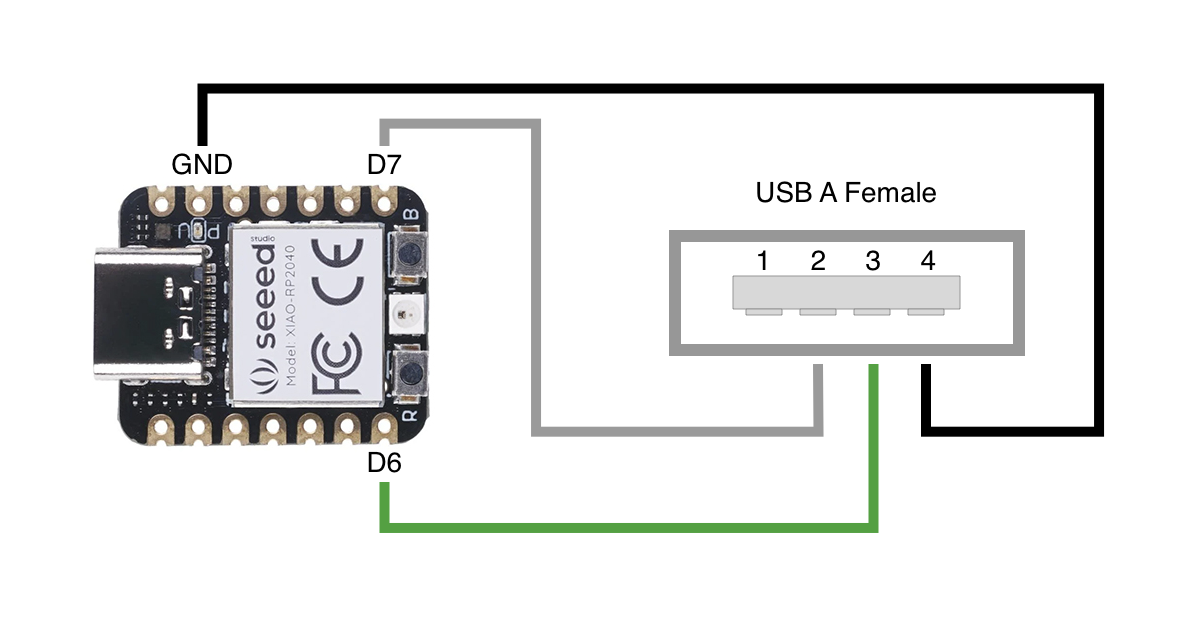
Read and write the flash of the M-VAVE FM-1 (JieLi AC791N / WL82) from a computer, through a small RP2040/RP2350 board wired to the FM-1’s USB lines.
Hardware
Three wires only. Do not connect VBUS; the FM-1 runs on its battery.
| Board | D+ | D- | Status |
|---|---|---|---|
| Seeed XIAO RP2040 | D6 (GP0) | D7 (GP1) | ✅ Recommended |
| Raspberry Pi Debug Probe (UART connector) | TX (GP4) | RX (GP6) | ✅ Tested |
| Raspberry Pi Pico | GP0 | GP1 | ⚠️ Builds, untested |
| Raspberry Pi Pico 2 | GP0 | GP1 | ⚠️ Builds, untested. May need external 15 kΩ pull-downs on D+/D- (RP2350 E9) |
| Waveshare RP2350-USB-A / USB-C / USB-CM | GP12 | GP13 | ⚠️ Experimental, not recommended. Needs board mods (remove the 1.5 kΩ D+ pull-up, keep VBUS off the FM-1) and a firmware port |
All boards: GND to GND.
Install
- Download the UF2 for your board from Releases.
- Hold BOOTSEL, plug the board in, and copy the UF2 to the
RPI-RP2drive. - Get
wl82loader.binfrom jl-uboot-tool. It is not included here; it is sent to the board’s RAM when you use the tool.
Use
Web app (Chrome or Edge): open web/index.html and follow the steps.
CLI (needs pyserial):
python3 tools/fm1t.py --loader wl82loader.bin info
python3 tools/fm1t.py --loader wl82loader.bin dump backup.bin
python3 tools/fm1t.py --loader wl82loader.bin write --package FM-1_vNN.fwsc --ref backup.bin --write
Without --write, write only checks. If the FM-1 has no working firmware, run fm1t.py rekey, then power the FM-1 on. See fm1t.py --help for the rest.
Build
pico-sdk 2.2.0, ARM GCC and CMake.
git submodule update --init
cmake -S . -B build -DPICO_SDK_PATH=$HOME/pico-sdk -DPICO_BOARD=seeed_xiao_rp2040
make -C build -j8 fm1_transporter
Pico: -DPICO_BOARD=pico. Pico 2: -DPICO_BOARD=pico2. Debug Probe: -DFM1T_BOARD=debugprobe -DPICO_BOARD=pico.
Cautions
- Use at your own risk. Always keep a dump before writing.
- Only
0x4000–0x93000is ever written. - After a session, power-cycle the FM-1 before using it over USB.
- Not affiliated with M-VAVE or JieLi.
Architecture · Protocol · Dev log · AGENTS.md
License
MIT. Includes Pico-PIO-USB (MIT). Some routines are ported from jl-uboot-tool (MIT).